
SuiteMob1.0.0 - App Store
You'll be able to see results in few seconds.
Publisher Description
Core Features
Access SuiteCRM modules in the app.
Modules in the app will be loaded according to the credentials and URL entered.
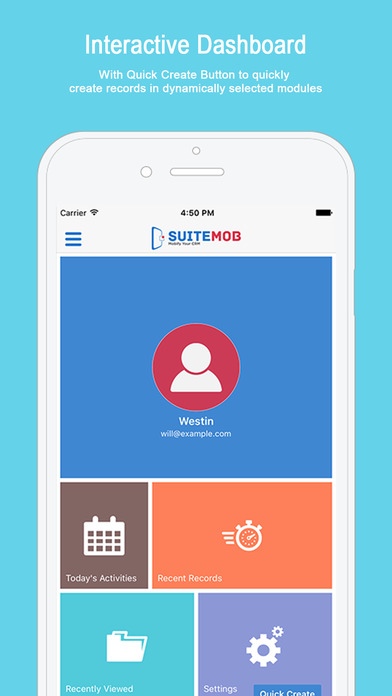
Interactive Dashboard - With Quick Create Button to quickly create records in dynamically selected modules
Quick Access to recently created and recently viewed records
Today s Activities - View all activities for the day from the dashboard
Edit your profile and configure your app settings from the dashboard shortcuts
Quick actions - Call, SMS or Email your prospects from a record's detail view
Locate Prospects - View address of a record in Map view
The Calendar module allows you to save calls and meetings for a particular date.
View calls and meetings for the day or for the whole month in the calendar module
It allows you to add, update and delete records which will get reflected in the SuiteCRM instance as well.
Configure Menus - Set priority and modules to be displayed in the main menu, quick create option and for the recent records
Forgot password and reset password feature available.
In - App Purchase Features
Offline Support -It is possible to save the modified data in offline mode. It will get synced with SuiteCRM later on when Sync.
Offline Sync Monitor - Sync all your offline records together or sync them based on modules, Monitor records being synced along with their stats from the offline sync monitor
360 View - View module-wise related records from the detail view of a record
Note: These features will be available only for a month. For further access to these features you need to purchase them from the app itself. The pricing structure will be as follows:
Related Modules : Monthly - $5, Yearly - $50
Offline Support : Monthly - $5, Yearly - $50
Combo : Monthly - $8, Yearly - $80
Suite CRM Plugin Link: https://store.biztechconsultancy.com/mobile-suitemob.htm
Requires iOS 8.0 or later. Compatible with iPhone, iPad, and iPod touch.
About SuiteMob
The company that develops SuiteMob is Maulik Shah. The latest version released by its developer is 1.0.0.
To install SuiteMob on your iOS device, just click the green Continue To App button above to start the installation process. The app is listed on our website since 2016-11-14 and was downloaded 0 times. We have already checked if the download link is safe, however for your own protection we recommend that you scan the downloaded app with your antivirus. Your antivirus may detect the SuiteMob as malware if the download link is broken.
How to install SuiteMob on your iOS device:
- Click on the Continue To App button on our website. This will redirect you to the App Store.
- Once the SuiteMob is shown in the iTunes listing of your iOS device, you can start its download and installation. Tap on the GET button to the right of the app to start downloading it.
- If you are not logged-in the iOS appstore app, you'll be prompted for your your Apple ID and/or password.
- After SuiteMob is downloaded, you'll see an INSTALL button to the right. Tap on it to start the actual installation of the iOS app.
- Once installation is finished you can tap on the OPEN button to start it. Its icon will also be added to your device home screen.
Program Details
System requirements
Download information
Pricing
Version History
version 1.0.0
posted on 2016-11-14
Disclaimer
Official App Store Link
We do not host SuiteMob on our servers. We did not scan it for viruses, adware, spyware or other type of malware. This app is hosted by Apple and passed their terms and conditions to be listed there. We recommend caution when installing it.
The App Store link for SuiteMob is provided to you by apps112.com without any warranties, representations or guarantees of any kind, so access it at your own risk.
If you have questions regarding this particular app contact the publisher directly. For questions about the functionalities of apps112.com contact us.
